Friday, 6 May 2016

How to Convert Audio or Video Files to Any Format Using VLC


You can’t deny the fact that sometimes converting audio and video to some other format becomes one heck of a task. We use different software to do the job and frankly speaking they do their job very well. The worst part comes at the time of installing these free software. They ask to install different kinds of other tools claiming to speed-up the PC and different kind of browser extensions to your computer.


vlc-Audio-Video-converterYou will be amazed to know that you can convert your audio or video file to any format using VLC. You can convert your media file into different formats with few simple steps which I am going to show you here.


Step 1 :
Open VLC media player and go to Media> Convert/Save.

Step 2 :

Click Add and select the file you wish to convert. Now click on Convert/save button to proceed.


Step 3 :

Now select a format you wish to convert in by clicking on drop-down menu available next to Profile.


Step 4 :

Now select a destination and click on Start.


Note:
  • Make sure to pick the right format for your device on which you are going to play the converted content.
  • If the video is large, you’ll see the timer on the player progress as it encodes to the new format.
So, why bother installing different software and getting irritated when you have your music and video converter already embedded in your VLC media player. Also, the sexiest part is that it provides you different formats to convert including “Video for Android HD, SD and video for YouTube HD, SD”.
Here is a list of formats that can be converted using VLC media converter.

Audio Format
Vorbis (OGG)
MP3
MP3 (MP4)
FLAC
CD
Video Format

Android SD Low
Android SD High
Android HD
YouTube SD
YouTube HD
MPEG4 720p TV/device
MPEG4 1080p TV/device
DivX compatible player
iPod SD
iPod HD/iPhone/PSP

Now you can convert your audio or video using VLC media converter easily, have fun :)

Thursday, 5 May 2016

8 Facts about Facebook No One Know

1. 600,000 hacking  attempts are made to Facebook accounts  every day.


2. Facebook is primarily 

blue because Mark 

Zuckerberg suffers red-

green color blindness.


3.There are about 30 

million dead people on

 Facebook.


4. Facebook, Twitter

and The New York 

Times have been 

blocked in China since 

2009.


5. Facebook earns an

average of US $5.85 

 from every U.S. user.


6. Facebook's founder

Mark Zuckerberg

donated US$1 billion to

charity in 2013, making

him the biggest

charitable donor in the

U.S.


7. Every minute, 1.8 

million new "likes" are 

made on Facebook.


8. Facebook is estimated


to spend US$30 million

a month on hosting

alone.

This Single Video Was The Reason Why Google Bought YouTube


Learners Bytes: Leading the online video revolution, Google bought YouTube in 2006. While the video-based website was yet to make any profit, a video posted on the website caught a Google employee’s attention and the rest is history. Read more to know the whole story and watch this video of two Chinese boys lip-sy

Nine years ago, back in 2006, Wojcicki was Google’s SVP for AdSense and Adwords. She was given the responsibility to run Google video initiative and look into options to grow the project. Luckily, she bumped into a video of two Chinese boys lip-syncing to “As Long As You Love Me” by Backstreet Boys.
Finding the video impressive and realizing its potential entertainment quotient, she says, “that was the video that made me realize that ‘Wow, people all over the world can create content, and they don’t need to be in a studio.”
Take a look at this video below:
Did you like this video? Add your views in the comments below.

Wednesday, 4 May 2016

Bored? 10 Things to Search in Google for a Funny Response


 www.Google.com
Google may be your go-to when you need to find some information fast, but it’s also a great destination when you’re looking to have a little fun while procrastinating online. Read on for 10 search queries you should test Google on for a fun way to take a quick break and learn something interesting in the process.

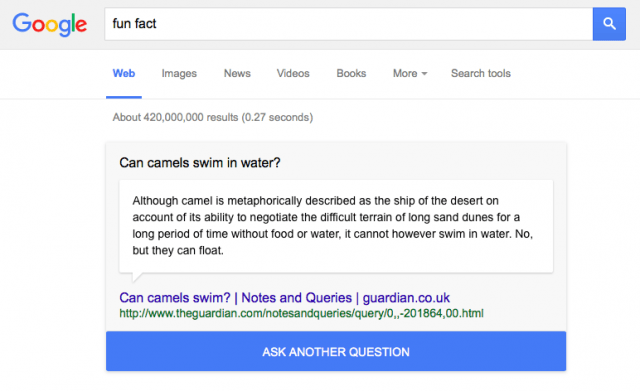
1. “Fun fact”

Google Search 'fun fact'
Source: Google.com
As spotted by Amy Gesenhues at Search Engine Land, the latest addition to Google’s lineup of procrastination-inducing tricks is the query “fun fact.” When you search for “fun fact” on Google’s newly-redesigned search page, the search engine will reply with a dynamic answer box that contains a randomly-selected question and answer, along with a link to the original content where it found the information.

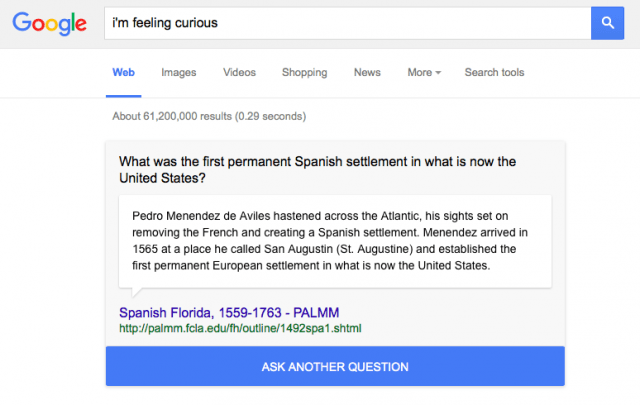
2. “I’m feeling curious”

Google Search 'I'm feeling curious'
Source: Google.com
When you click the “Ask Another Question” button that appears when you ask for a fun fact, Google returns a search for “I’m feeling curious.” That gives you another dynamic answer box with another random fact. You can also choose to Google “I’m feeling curious” on the first try, and the answer, conveniently, will also include the “Ask another question” button for an easy way to fall down the rabbit hole of random, fascinating information. (Other questions Google answered for me included “What plant does vanilla come from?”, “How long is the earth’s circumference?”, “Which country has the most camels in the world?”, and “Who were the first people to use money?”)

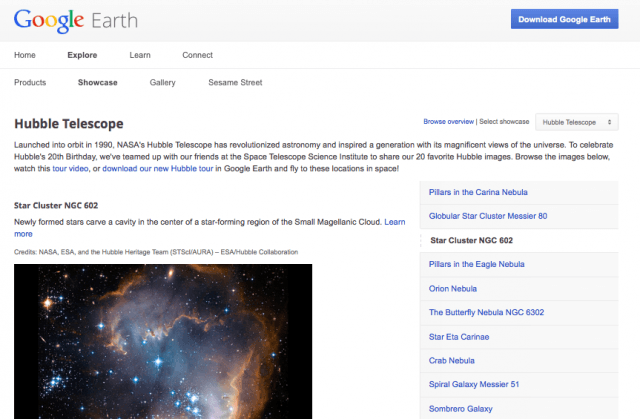
3. “I’m feeling stellar”

Google Search 'I'm feeling stellar'
Source: Google.com
A number of other fun options are available when you hover over the “I’m feeling lucky” button back on Google’s search page. The button automatically takes you to the first page returned for your query, which has some interesting results. If you click “I’m feeling stellar,” Google shows you a showcase page on Google Earth’s Explore feature. I got one on the Hubble Telescope’s images of the Star Cluster NGC 602.

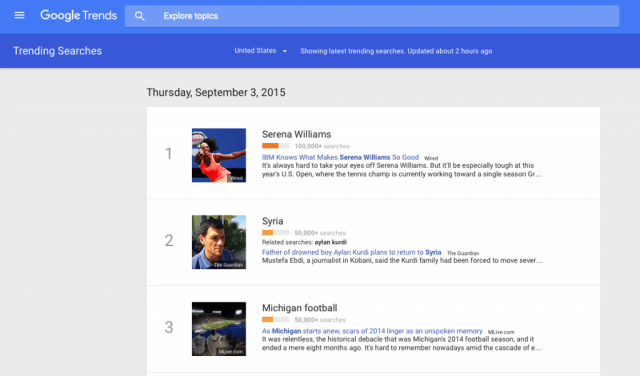
4. “I’m feeling trendy”

Google Search 'I'm feeling trendy'
Source: Google.com
If you click “I’m feeling trendy,” Google takes you to the Google Trends page for the latest trending searches. From there, you can explore the top searches for the current day or the previous day, or even switch to exploring the trends in a different country.

5. “I’m feeling wonderful”

Google Search 'I'm feeling wonderful'
Source: Google.com
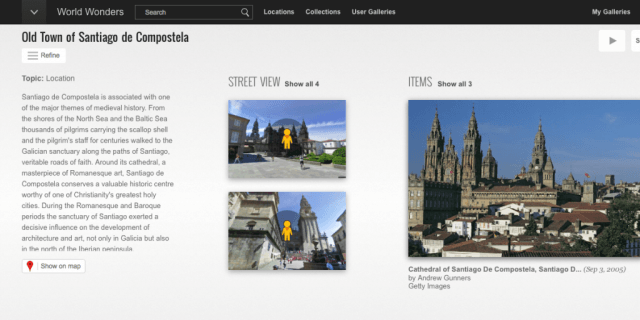
If you click “I’m feeling wonderful,” Google will take you to a Google Cultural Institute page on one of the world wonders. You can scroll through photos, explore the location on a map, or look at other locations, collections, and even user galleries.

6. “I’m feeling playful”

Google Search 'I'm feeling playful' Moog doodle
Source: Google.com
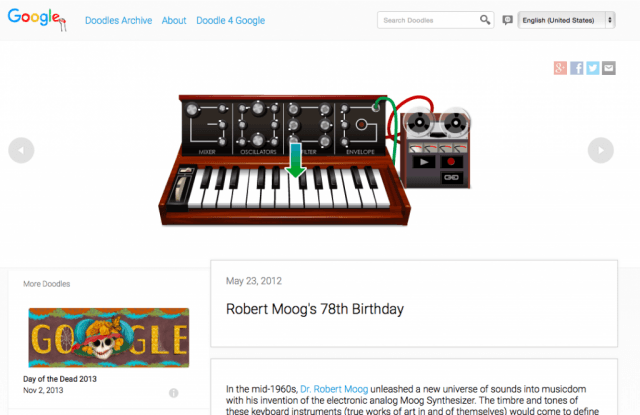
If you click “I’m feeling playful,” Google will take you to one of its fun, interactive doodles. I got a May 2012 doodle for the electronic analog Moog synthesizer. The page included not only the interactive doodle, but accompanying text complete with a diagram of the synthesizer’s parts and an explanation of the history behind it.

7. “I’m feeling puzzled”

Google Search 'I'm feeling puzzled'
Source: Google.com
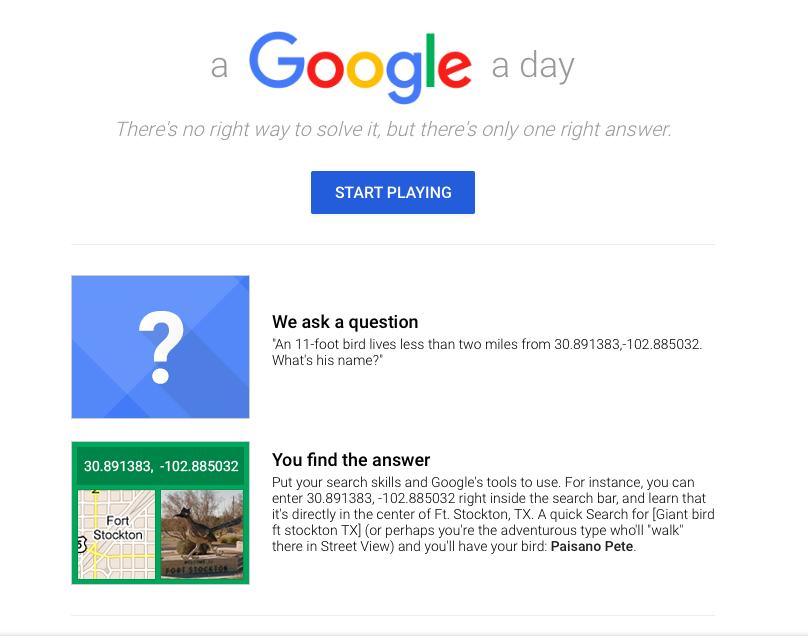
If you click “I’m feeling puzzled,” Google will take you to its “a Google a day” page, with a puzzle for you to solve. In a fun role reversal, Google will ask you a question, and then you’ll use your search skills to find the answer.

8. “I’m feeling doodley”

Google Search 'I'm feeling doodley'
Source: Google.com

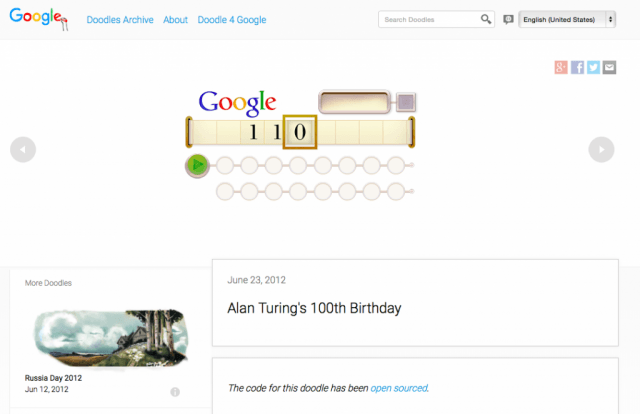
Clicking “I’m feeling playful” isn’t the only way to a trip down memory lane through Google’s doodle archive. If you click “I’m feeling doodley,” Google takes you to one of its archived doodles. Google took me back to a June 2012 doodle for Alan Turing’s 100th birthday — an impressive one that Google says took a record amount of user testing and iteration.

9. “I’m feeling generous”

Google Search 'I'm feeling generous'
Source: Google.com
If you click, “I’m feeling generous,” Google takes you to the page on its One Today app, which enables you to discover nonprofit projects, easily donate, and get your friends to match your donations.

10. “I’m feeling artistic”

Google Search 'I'm feeling artistic'
Source: Google.com
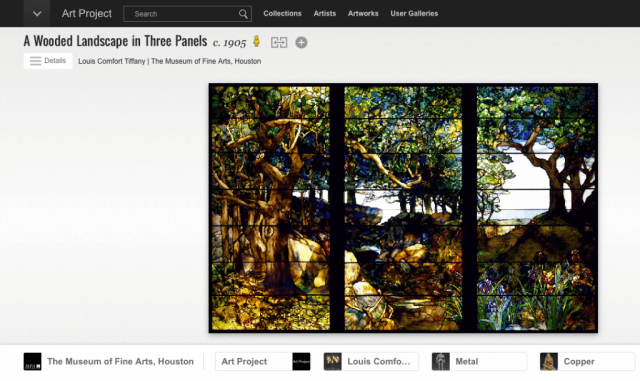
If you click, “I’m feeling artistic,” Google will select a page from its Art Project website, which is a platform where you can explore high-resolution images of pieces of artwork housed in a number of museums around the world.

Monday, 2 May 2016

The Man Who Knew Infinity Mathematician - Srinivasa Ramanujan


Learners Bytes: Srinivasa Ramanujan was an Indian mathematician during the colonial era. His priceless contribution to mathematics has been appraised all over the world. A movie portraying Ramanujan was recently released on April 29.

The calendar says March 17, 1914, a bright sunny day in Madras and there is a decent man present at the ship dock in Madras. He is all set to get aboard the SS Nevasa and he would be living the next several years of his life in London at Trinity College. Mathematician S. Ramanujan – The Man Who Knew Infinity – was a childhood prodigy who had command on all the complex maths equations and theorems just like a knife in the butter.


About a year before, Ramanujan had written a letter to G. H Hardy after seeing his book Orders of Infinity. The letter was a collection of Ramanujan’s self-derived equations and unproven theorems. Initially, Hardy was adamant about his work and to him, it possibly seemed to be a fraud. But it was later when he analyzed them and got fascinated by the work of Mathematician Ramanujan. “They [theorems] defeated me completely; I had never seen anything in the least like them before,” Hardy commented.

Hardy, along with John Littlewood, made sincere efforts to bring Ramanujan to Trinity. At first, the mathematician was reluctant to leave his motherland but he was later convinced by E. H. Neville who was Hardy’s colleague lecturing in Madras. Ramanujan spent around 5 years in London after which he returned to his home in the year 1919. This was due to his deteriorating health and homesickness that he had been experiencing as he was far away from his home.

Mathematician Ramanujan was born on December 22, 1887, in Erode, Madras Presidency (present Tamil Nadu). He began to sprout right in his childhood, breezing through complex mathematics formulae and equations. He first tasted mathematics when got enrolled in Town Higher Secondary School around the age of 10. He had re-derived many popular theorems by himself and exhausted the knowledge of the mathematics students living as lodgers at his home. Ramanujan continued to impress people and mathematics geniuses throughout his life.
An interesting story is about the number 1729, it’s a simple four digit number for most of us and we may haven’t noticed if it was written somewhere. But for mathematician Ramanujan, it was way more than a number. The number is known as taxicab number. Hardy recalled his talk with ill Ramanujan, he told him that he saw 1729 on a taxi number plate and he found it boring. “No,” said Ramanujan, “it is a very interesting number; it is the smallest number expressible as the sum of two cubes in two different ways.”

His work includes many research papers and four notebooks that are a compilation his equations and theorems he worked out in isolation. He invested efforts in the field of infinite series, continued fractions, number theory, and mathematical analysis. He mostly used to write only the results of his findings due the fact that paper was not cheap at that time. That may be the reason of conflicts between him and other mathematicians who misunderstood as his writings didn’t contain the proof of results he mentioned.
As a person, he was delineated as an introvert person and orthodox when religious beliefs were concerned unlike the great physicist Albert Einstein who didn’t believe in the existence of god but a superpower that governs the universe. He credited and believed that his family goddess’s blessings were the source of all of his knowledge and that she enlightened him about all the equations and theorems he came up with.
Ramanujan went to rest in peace in the year 1920 at his house in Kumbakonam, Madras Presidency. He had a medical history since an early age. While in London, he was diagnosed with tuberculosis and had to live in a sanatorium. The cause of his death was analyzed by Dr. D. A. B. Young in 1994, he concluded that Ramanujan had died because of hepatic amoebiasis – an infection in the liver.
A mathematics pioneer left the world at the age of 32. His contribution to mathematics will never be forgotten. Srinivasa Ramanujan has been portrayed in writings and movies numerous times. A movie based on his life released on April 29, titled as The Man Who Knew Infinity. In the movie, the Slumdog Millionaire fame actor Dev Patel played Ramanujan and the British actor Jeremy Irons as G. H. Hardy. I haven’t watched the movie yet but the trailer was enough to give me goosebumps. What I have understood from the trailer is that movie tries to elaborate the situation of dilemma Ramanujan had to deal with as he unable to convince other mathematicians that his work was not a wellspring of fallacious assumptions.
Check out the trailer:

Do You Know Why Hard Disks & Pen Drives Have Less Space Than The Promised Space

Pen drives, hard disks come under the category of USB flash drive. USB flash drive is also known as USB drive or USB stick. It is a data storage device with an integrated USB interface which includes flash memory. Presently, pen drives and external hard disks have been part of our life just like smartphones. But have you ever checked that the pen drives storage capacity is different to that of the promised space by the manufacturer?

Yes, the storage space differs for sure. For example, let us take a 8 GB pen drive and after plugging it to your computer, you can see that only 7.46 GB space is available.

Then where is the rest of 0.54 GB ? Scratching your head and cursing the manufacturer? Well, there is a trick used by the manufacturer here. Let me  explain it clearly.
A simple of math involved in this. Generally, every one of us knows that computers work using number 2 as the base. According to this the memory management will be :

1 KiloByte (KB) = 1024 Bytes
1 Megabyte (MB) = 1024 Kilobytes (KB)
1 Gigabyte (GB) = 1024 Megabytes (MB)
8 GB = 1024 * 8 = 8192 MB
But pen drive and hard disks manufacturers consider it as base 10. i.e
1 KiloByte (KB) = 1000 Bytes
1 Megabyte (MB) = 1000 Kilobytes (KB)
1 Gigabyte (GB) = 1000 Megabytes (MB)
8 GB = 1000 * 8 = 8000 MB ( approximately equal to 7.81 GB)
and the rest of the memory (approximately 0.35GB ) is reserved for data sector and system files for better performance.
As the device memory capacity increases, we lose more amount of space. The table below shows some shocking figures.

Manufacturers are actually not cheating anyone in this whole drama. In fact, they mention this on the box of hard disks and pen drives. Take a close look at your hard disk boxes.

Image Source: Google Images
Share your views in the comments section below.
Download Free Game

Popular Posts