Thursday, 30 June 2016

Uber Promo Code Hack Shows How To Get Unlimited Free Uber Rides


Learners Bytes: An independent security researcher has found a critical vulnerability in Uber’s app that allows an attacker to brute force the invite URL and grab unlimited promo codes up to $25,000 for unlimited free rides. However, Uber has refused to acknowledge the flaw and passed the bug report to its fraud team.

An Egyptian security researcher has uncovered a flaw in the ride-sharing app Uber, that allows a customer to use Uber service for free with the help of unlimited promotional codes.
This critical vulnerability is exploited by brute forcing the system repeatedly and grabbing other people’s free promo codes. This Uber promo code hack lets a person earn up to $25,000 for more than one free ride.

The hacker, named Mohamed M.Fouad found this vulnerability in the URL get.uber.com/invite/, which is used to sent an invitation to any other user.
In his blog, Mohamed writes that he found lack of protection against any type of brute force attacks. This gave him a chance to get different promo codes with “high amounts in dollar currency between 5,000$ to 25,000$”. 25000_dollars_new uber hack reply
These high-value codes may be related to some other vehicles–like a helicopter–other than cars.
The security researcher has also made a demonstration video, showing this Uber hacking attack in work. Here’s the video:
You might not be knowing that Uber promo codes are of two types — public invite promo codes and hidden/private “Emergency Ride” code.
While public codes are generally meant for the new users, this Uber promo code hack lets an existing user to use them to get free rides. Also, by coincidence, an attacker can get a valid Emergency Ride code that’s supposed to be hidden.

25000_brute_force_response uber hack reply
Surprisingly, Uber has refused to acknowledge this finding related to Uber promo code hack and called the flaw out of the scope.
Mohamed says that he has reported this vulnerability repeatedly but Uber considers this as fraud and sends the request to the fraud team.

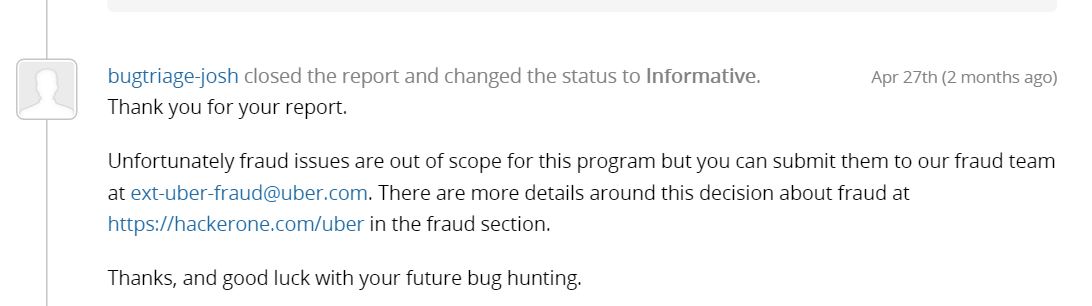
uber hack reply 1This Uber promo code hack vulnerability continues to exist in the Uber app and poses a great risk to all the users.
Did you find this article interesting? Don’t forget to drop your feedback in the comments section below.

Friday, 22 April 2016

Learn Mass Email Attack Kali Tutorial


Mass Email Attack Kali Tutorial


Mass email senders is not a new topic for ethical hacking community . Certainly we need to send mass emails during penetration test / phishing tests (to be more specific) . While Phishing tests penetration testers often need to send Bulk emails to the employees of an organisation we are conducting the penetration test for .
Though there are many Bulk Mail sending softwares available out there but there is nothing as good as bulk sending tool that is already present in our favourate penetration testing OS : KALI Linux
Disclaimer – Our tutorials are designed to aid aspiring pen testers/security enthusiasts in learning new skills, we only recommend that you test this tutorial on a system that belongs to YOU. We do not accept responsibility for anyone who thinks it’s a good idea to try to use this to attempt to hack systems that do not belong to you
In this post I will be sending mass emails using Kali Linux and SET (Social Engineering Toolkit)
To begin with the Mass email attack , you first we need a Email list that we have either harvested or has been supplied to us by the organisation we are conducting the penetration test for .
Now I will be opening Social Engineering Toolkit , SET :
Simply Open Termial and type :
se-toolkit
And SET opens Up
74
Select Social engineering i.e Option 1
Now as we need to do a mass email Attack (Mass Mailer attack select option 5)
Option 5 : Mass Mailer Attack
Then select Option 2 for email mass mailer as this tutorial we deal with Email Mass sender and not the Single Email Address . The Option 1 might be useful spear-phish attacks .
Option 2 : Email Attack Mass Mailer

71
Now you need to define the path to the email list . This is email_list in our case , just add the file-name with the path .
vss
Now select Option 1 as we will be using a gmail account for sending the Mass emails as we dont have our own SMTP server . In case you have a self email server / SMTP (as done by the proffessional spammers)server feel free to explore the other options .
Option 1 : Use a Gmail account for email attack
Enter the gmail address . The email address must be correct and you must also have the password for the same to successfully send the emails .
Now enter the name that you want the email recipients to see in the Inbox . This is the Name that will flash first in front of your victim . Pay attention to this field specifically , as this where the actual social engineering takes place .
This could be “Admin” in case of a spear phish attack .
Now the SET will ask you to enter the password for the email account .
Enter the gmail password
Now you have an option to specify weather or not you want to flag this message as high priority . Sometimes this may work and sometimes might make the victim suspicious . So I suggest to use this option as per your suitability .
Screenshot
Now SET will ask you to enter the subject of the email .
Enter the subject of the email
Now the SET will ask you if you want the body of the message to be HTML or Plain Text .
P for plain text or H for html
Enter the body text
Enter the body of the email here . If you chose HTML message then add the HTML tags as well .
Enter Control+C to send the email .
Enter to go back to the main menu
This is how hackers perform mass email attack.

Learn How To Scan website for vulnerabilities using Uniscan kali-linux


Scan website for vulnerabilities using Uniscan kali-linux


Uniscan is a simple Remote File Include, Local File Include and Remote Command Execution vulnerability scanner. It’s a very simple yet quite powerful tool to scan website for vulnerabilities in Kali Linux (or any Linux as a matter of fact). It does the job fast and without hassle. You don’t need too much experience to run it, but you might need a good Internet connection and a very long time.
Uniscan got a text or CLI based scanner and a Graphical interface. You can use either but I found CLI to be somewhat faster. But I could be wrong.

Scanning websites using Uniscan

Scan the given URL (-u http://192.168.1.202/) for vulnerabilities, enabling directory and dynamic checks (-qd):
7


Scanning website using Uniscan-GUI

First run uniscan-gui using the following command from your terminal:
root@kali:~# uniscan-gui
In the GUI you type in the URL of the target site and select the checks you want to perform. Press Start Scan and off you go.
5


If you want to check everything, it’s better off using uniscan from command line with a -b flag to have uniscan running in background. For example:
root@kali:~# uniscan -u test-a.site.com -bqdw
There’s many other tools and I will discuss them in time. In the meantime you can use few tools like hping3, slowloris, GoldenEye etc. to do stress testing

Kali Linux Rolling Release - Best Features That Make It The Best OS For Ethical Hackers

Learners Bytes: Kali Linux, a hacker’s favorite operating system, is now available with first Rolling release. This release ensures that you are always using the latest and best tools for pen-testing purposes. The first Kali Linux Rolling release also brings a Kali Linux Package Tracker tool and changes the way VMware guest tools are installed. You can read more about the features below and use the links for downloading Kali Linux Rolling 2016.1 ISO files and torrents.
Kali Linux is an incredibly powerful tool for penetration testing and it comes with more than 600 ethical hacking tools, including Wireshark, Nmap, Armitage, Aircrack, Burp Suite etc. In its last release i.e. Kali Linux 2.0, Offensive Security brought some big improvements to make things easier.
January marked an important milestone with the first public release of Kali Linux Rolling distribution after a long testing process. Kali announced that it’s switching to Rolling version last year when the OS hit version 2.0.

How Kali Linux Rolling release will work?

With time, Rolling releases are gaining on the traditional fixed-release Linux distributions. For those who don’t know, a Rolling-release is a Linux distribution that is constantly being updated with the latest patches and features.
In Kali’s case, instead of basing itself on standard Debian releases, Kali Linux Rolling distribution ensures that you get the advantage of continuous releases from Debian testing.

The new features/changes introduced in Kali Linux Rolling

Kali Linux Rolling promises newest apps all the time

While some might argue over the instability and bugs a Rolling release brings, we can’t deny the fact the it also brings the newest and best software. Kali Linux Rolling promises the latest stable releases of the tools, sometimes pushing the update into Kali repos as soon as 24-48 hours from the notification of a tool update.

New Kali Linux Package Tracker

Offensive Security also brings the new Kali Linux Package Tracker that will allow you to follow the evolution of Kali with the help of a powerful web-based interface. With this tracker, you can check the installed and newest versions of tools at any moment.

VMware guest tools installation

The Kali Linux Rolling release marks a change in the way how VMware guest tools are installed. The release takes care of the VMware recommendation that suggests using distribution-specific open-vm-tools instead of the VMware Tools package for guest machines.

How to update from static Kali Linux 2.0 to Kali Linux Rolling?

The transition from Kali Linux 2.0 to Rolling release is just a couple of commands away. Just enter the following commands in Terminal and your are ready to go:
You can also download Kali Linux Rolling 2016.1 from Kali’s website. Visiting this link, you can get download links for Kali Linux Rolling 2016.1 ISO files and torrents.

Download Free Game

Popular Posts